
Cyber Checkup 2024 - Safety Scoop Transcript
Introduction
Kirsten Barber: You're listening to the NCDPS Safety Scoop, a podcast that dives into the stories of the people, programs and resources within the North Carolina Department of Public Safety. Each episode, we’ll give you the scoop from department personnel on how NCDPS enhances the safety of the people of North Carolina.
[Pause]
Season 3 Episode 7
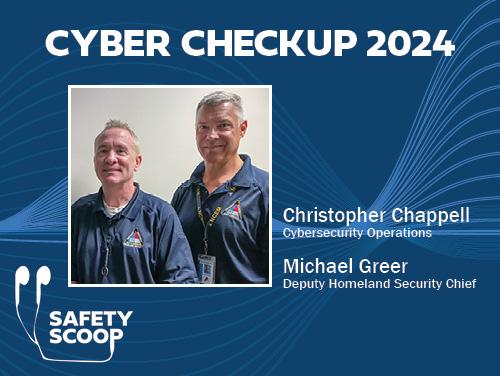
Kirsten: In this episode of the Safety Scoop, we get to meet members of a team that most North Carolinians won't ever see or even know about. Michael Greer and Christopher Chappell are part of the Homeland Security Section within the North Carolina Emergency Management Division.
Michael Greer: My name’s Mike Greer, and I’m the Deputy Homeland Security Chief for North Carolina Department of Public Safety, Department of Emergency Management. Um, I've been with DPS for 2 years now, retired FBI agent and worked cyber for many years with the FBI. So, happy to be with DPS.
Chris Chappell: Chris Chappell, uh, also Homeland Security Section. Uh, I am almost on my one-year anniversary. I retired last year from the Durham Police Department in July. I served 17 of those years on the FBI Cyber Crime Task Force, and that’s how I met Mike originally.
Kirsten: Cybersecurity and hacking are not only topics you'll see broadcast in the evening news but have been a growing fixture in pop culture. Even this year, several movies or TV shows that involve cybercrime, phishing, hacking or another cybersecurity topic have been released. But these things aren't fictional and can be very real and life-altering to the people that are affected. Both of our guests have years of experience in the cybersecurity field and over the course of this episode will share valuable insights on how you can be cyber smart and protect yourself and others by knowing how to recognize and evade threats.
…a lot of experience and really excited to dive into this topic with you both. We're just going to start out with what interested you in a career with cybersecurity, so Chris, we're going to start off with you.
Chris: I think for me, it’s a natural fit. Uh, I'm a computer forensic examiner. I did that sort of work, uh, while assigned to the FBI task force. Also, I was given the opportunity to, uh, to do some overseas teaching through the State Department's Anti-Terrorism Assistance Office where, uh, we would go overseas to either military installations or friendly governments and provide training in–in
either, uh, network security, cybersecurity or computer forensics training. So, um, as my law enforcement career was winding down, I was fortunate that, um, the FBI agent who had originally recruited me to the task force, Tom McGrath, he was, um, just getting ready to retire. He said, “You know, we're probably going to have some openings soon, and, uh, I think you should apply.”
Kirsten: Thanks for sharing, and Mike, what about you?
Mike: Um, so, I’m–I've been around a long time, long in the tooth. I worked, uh, as an IT guy out of college. I was always in IT. Um, got in the FBI and was on all the various cyber squads during my time. We did everything from child exploitation task forces with Chris to internet fraud to computer intrusions, criminal and national security, and a lot of terrorism cases, as well. When I retired, I went back to the private sector and worked cyber for a while doing cyber security for a law firm, uh, here. And then, much like the path that Chris took here, Tom McGrath, my old squad mate, was here, and he was talking about some openings here at DPS in cybersecurity, so that's–that was my door, uh, into DPS and to cybersecurity, as well.
Kirsten: Well, Mike, I'd like to get your insight on what role does the Homeland Security Section play in North Carolina Emergency Management?
Mike: Well, Homeland Security Section is the newest section in DPS, so we–we’re kind of new to, uh, Emergency Management, but–but basically, we consist of an intelligence role. We have intel analysts that work for us. We have critical infrastructure, key resource analysts who work with the 16, uh, critical sectors throughout the state, and we also have a cyber squad that works with the cyber matters. Um, Chris and I work a lot more on the cybers part of this because of our background, and we–we, uh, also co-chair the Joint Cybersecurity Task Force in North Carolina. So, EM basically coordinates most of those activities. We also have the National Guard G6 Cyber Squad that will do incident response and training. We have Department of Information Technology who is part of the task force, and we also have—you ready for it? A long word here—it's NCLGISA [nickel-gee-suh], the North Carolina Local Government Information Systems Association. So, those are the four key members of the JCTF.
Kirsten: Yes, that is quite a mouthful.
[Both laugh]
How many times did you have to practice?
Mike: It took me a while.
Kirsten: Can you explain the importance of cybersecurity in today's digital age?
Mike: Yes. So, basically, uh, as you well know, a-anybody that does anything in–in today's, uh, technology world, you're using technology with everything you do
from your phone to your laptops to your–your job, um, everything you do involves technology. Almost everybody is doing online banking. Everything you do is online now, so cybersecurity is a really key, important role there because if you're not protecting your information online, uh, threat actors can come and steal your information; steal your money; steal your, uh, intellectual property; uh, trade secrets. Everything revolves around, uh, protecting your cyber footprint. Really, cybersecurity is–is–is ingrained in everything we do now.
Kirsten: Chris, can you take us through some of the latest trends in cyber threats? Um, what do North Carolinians need to know to protect themselves?
Chris: I’d say a lot of what we see can be broken down in–in four pretty broad categories. Uh, the–the biggest one, the main one that we see on a daily basis, is ransomware, and that's a threat actor compromising the system, encrypting the data and then extorting the owner of that data for money or goods, some tangible thing that they’ll give them the key and unlock their data for them. The problem with that is oftentimes if the person does comply and gives into that demand, there's nothing that stops the threat actor from coming back and saying, “Now I need you to give me some money or else I'm going to release that data that I stole from you that’s sensitive onto the internet.” So, um, for state, tribal, local government entities in North Carolina, there's a–a state statute that actually prevents governmental entities from either even communicating, let alone paying the ransom for ransomware. The hope behind that is if you make a–a law forbidding governmental entities from engaging with the threat actor in a ransomware scenario, there won’t be the incentive for them to target those entities.
Really, the–the only way to protect yourself in those scenarios is, um, backups of your data, regular backups. Segmenting your network or compartmentalizing your network so that everything that doesn't need to talk to everything else doesn’t. So, in a–in a home scenario, uh, let's say you have Internet of Things devices, smart devices, cameras, whatever. Make a–a segment of your network, a virtual segment, or–or put it on its own separate network with a different router so that that way those devices at least if they are exposed to the internet and get compromised, they won't potentially infect other devices inside your network. In a business environment, setting up rules on your firewall to prevent things from initiating communications. Like a lot of–a lot of environments, they don't allow printers, for example, to initiate communication from the printer to another device. They can receive those. You know, because the print job is being sent to them, but if a device that's infected on the network, then starts trying to communicate with other internal devices, that’s one of those red flags that a rule could potentially prevent and limit some of that damage.
Uh, another threat that we see a lot is, uh, misconfigured or unpatched systems. So, a–a misconfiguration might be leaving the default password on a router that you buy. You–you got it five years ago, you got it right out of the box, you plugged it in, you–you set up the–the network key (hopefully, ‘cause you don't want a–a wireless network that doesn't have a password on it), but then you
didn't change the router password to administrate the network. So, a threat actor gets on your network, can put in the default password and then change the settings and potentially lock you out of your own network or do other nefarious things.
Unpatched systems would be things that don't have updates, so whether that's software things like a–a program that's years old that, you know, there's been updates that have been pushed for that, and it's not running the latest version of th–of that software. Could be firmware for, again, a router or a printer, some sort of thing that the manufacturer has pushed a–a firmware update to patch a security hole, and you’ve just chosen not to install that. We see these, um, commonly in business scenarios where there might be some server, some service running on the server that's exposed to the public internet that a known vulnerability has been published, um, by the Cybersecurity Infrastructure Agency (CISA). And, you know, we might be alerted to the fact that this known exploit, known vulnerability, is being actively used and make notifications to those entities that, “Hey, you’ve got this server that needs to be updated,” or “It’s end-of-life, and it isn't supported anymore by the manufacturer, so this really is hardware that needs to be replaced to keep your network safe.”
The other, um, threats that we see a lot of just in general, social engineering, compromising the person to compromise the network rather than attacking the network directly. So, tricking them out of sensitive information, um, directing them to a mem–a malicious website to capture a username and password that then they can exploit and get back into the network pretending to be that user. Um, calling you up pretending to be the IT department sending you some sort of message that, you know, there's a problem with your bank account. You need to click here and login to verify your password or else your–your account will be suspended. You won't be able to pay your bills. That, it's overcome with education, uh, recognizing signs of a phishing email, a phony email to try to trick you into releasing that information.
And then finally, uh, sextortion. We’ve seen a–a large rise in the grooming or–or tricking people to share sensitive photos or videos and then, again, extorting them for something, whether that's something of value or extorting them into making more images or more videos. And in that situation, kids are using an internet device that has a camera on it and a connection to the internet, so for the–the threat actor, it's–it's a very easy thing for them to exploit. They're targeting children in places where children are likely to be: online gaming communities and chat applications and platforms where they know it's a target-rich environment.
You know, from a kid's perspective, what we have found is they tend to give equal weight to that person that they know virtually the same way as the kid that they ride the bus to school with every day. And they don't really differentiate between “well, this is the person that, you know, we–we play the same game, that we’re in the same league, the same clan, the same group online. I–I see him all the time when we've logged in and, you know, I know
certain things about him.” Whether or not any of those are true, they don't lend that credence, um, until it's too late and the–the bad guy’s insinuated themselves into the person's friend group. They know all their friends; they get that first image or that first video and then they hold that over them. “Well, you know, all those 200 contacts that you have that you’re so proud of, those followers, I'm going to send this picture to all of them if you don't do x.”
And really, the only way to–to combat that is for parents to have a–a good open relationship with your kids so that the kid does not feel reluctant to discuss “hey, I–I've been exposed to something online that made me uncomfortable.” You don't want the–the kid to have the thought that, you know, “If I–if I tell Mom or Dad about this, they're going to take my internet privileges away from me.” So, um, knowing that the threat is out there and having an honest conversation with your kid to let them know there are bad people in the world virtually as well as in person.
Kirsten: I really appreciate you going through all of those and, um, I–I feel like many of our listeners can relate to at least one of the examples that you provided. I mean, we see a lot of things that you talked about even in pop culture, or movies that have come out recently are really, um, breaching this topic of malicious actors online, these phishing schemes that you talked about, so I really appreciate you giving those tangible and relatable examples. So, to go a little bit deeper, and for those listeners who may be learning about these things for the first time, what are some basic cybersecurity practices that anyone…?
Chris: I think the first thing is you have to assume that you're going to be a target. It's not a matter of–of if; it's just when. And informing yourself about some of the common schemes, the common tactics, knowing that there's going to be pressure put on you for, you know, a great deal that sounds too good to be true ‘cause it probably is, or, you know, this–this sense of urgency that they create with the phishing emails that your–your bank account has been suspended unless you login, or this package has been interrupted. Maybe you're–you’re not even expecting a package, but it’s that moment of inattention where you get this text message that has a link to “click here” and, you know, verify the delivery address.
A big tip would be to reduce the amount of your publicly available information. There are services to remove data from all these online brokers of information. It makes it very easy for someone with ill will towards you, whether that person is, you know, the threat actor targeting you because you work for a particular company, and they’re trying to spearphish you to get access to that company network or whether it's somebody with malicious intent to harm you ‘cause, you know, they're that–that creepy person that won't take “no” for an answer that keeps–keeps hounding you, keeps bothering you. So, doing things to remove the personal data, your online footprint, um, is–is very important.
There are services to remove data from online data brokers. You can do it for free yourself by going to all these different sites and following their particular
opt-out policies. You can pay third party providers to do that for you. There are a number of–of things that a threat actor can use to just get more information about you, um, guessing about your background, things like when you set up a secret question in the event that you forget your password. Well, if all your personal information is out on the–the internet, it doesn't take long for somebody to guess, okay, well, their secret question is “what year did I graduate from college?” or “what's my husband's name?” or “what school did I go to?” And, um, by having this kind of information publicly available, it makes it really easy for someone with malicious intent to quickly develop, uh, a profile of you.
Kirsten: At this point, Christ handed me a stack of paper, and from my response everything he just went over falls into place.
Chris: I can pause here for a second.
[Kirsten gasps and then laughs]
Kirsten: So, I have just been handed, um, maybe what I would call a–a profile that someone could use just from publicly available information, um, but it is enough information that someone could potentially use to grab my attention to maybe make me feel that something that they sent to me via email or text is trustworthy, is from a credible source. So, very interesting, uh, information here, uh, a little bit nerve-wracking, but–but it does speak to how careful we need to be, and there are, um, instances where people might find that they are oversharing on the internet, on social media, maybe their privacy permissions are not set up, um, correctly to protect themselves.
Chris shared that he was able to pull everything that was in the stack of paper in a matter of minutes. This was a basic search that required no intense digging, just skimming the surface to see what he could find out there. When I asked if he could go deeper, he said to give him 30 minutes, and he could show me what you could find. My response? No, thanks. I want some tools to combat what I can, on top of staying alert about current schemes and tricks that may be used against me.
Chris: And so, kind of continuing down that path of protective steps, my advice to everyone is on those sites that make you create those secret questions for password recovery if you forget your password, never make the answer to the question the obvious choice. Make it difficult on this [unintelligible]. If you can make a password strong, at least 14 characters using uppercase, lowercase, a number and then some sort of special character, that is always the best practice. The sites that do not allow you to make a complex password, or they say the password can be a maximum of six digits, you know, that's something that exposes you to potential risk because how hard is it then for the threat actor to–to guess the six-digit password at some point?
The choice to use a passphrase, for example, is–is always preferable to trying to remember some very difficult alphanumeric password. And a passphrase can be
something as–as easy as a–a sentence or a phrase that has a number, that has a letter, that is a–is a sentence, but it's written in a way that is easy for you to remember it. I have some examples of some different passwords that start out with just there's a seven-digit password that has one number in it and all lowercase letters, so si–a six-letter word and one digit. The keyspace that you would have to have in order to brute force attack that password would be 36 characters to encompass all lowercase letters and the–the 10 numbers. So, you can run all the different permutations, uh, 00000 seven times, up until you get to the right combination of letters and–and numbers.
This particular website, Gibson Research Corporation, they call it the–the password haystack. How big is your haystack to hide your password inside? And it computes the estimated time that someone using a–an online attack scenario, assuming a thousand guesses per second, would take to break a particular password. You can enter that into their website, and it will calculate that for, um, an offline fast-attack scenario where they have your password because it was part of a data breach, and they just have to decrypt the password that was stored, say, with your LinkedIn account. If it was not a–a robust password. And in this first scenario, with the one-digit number and the six-character lowercase password, it would take 8/10 of a second to break a password that’s a keyspace of–of 36 characters.
Now, if I just capitalize the first letter of the word in the password; it's the number one and then cookie, 1cookie. If I capitalize that C, it's still a seven-digit password, but because now I've included in an uppercase letter, the keyspace becomes 62. So, in a offline fast-attack scenario, where that password was–was part of a data breach, it would take about 36 seconds to break that password. Now if I add an exclamation point or some sort of special character to that: one capital C cookie exclamation point [1Cookie!]. That’s an eight-character password now, but because I’ve added the special character, now there's a pool of 95 different characters that have to be attempted when this is brute forced. And so, that would now become a little more than–than 18 and 1/2 hours to break that password. And then, if I still use a–a special character, still use a number, still use upper and lowercase but make this a passphrase that's easy for me to remember. So, the number sign (the hash sign), one, capital C, lowercase o, the number zero, k-i-e all in lowercase, colon (special character again), capital S, u-g-a, apostrophe (#1Co0kie:Suga’). 14 characters, it's not anything that'll be in a dictionary, so it won't be easy to–to guess that way. That then becomes, in an offline attack scenario where that's been breached, 15.6 million centuries to break that password.
Kirsten: Wow! And you haven't shared your…
Chris: Nope!
Kirsten: …your personal password?
Chris: Nope, that–that’s just an example! I wouldn’t suggest using that because that's probably going to be added to all the dictionaries by the bad guys by the time your podcast airs. But, um, I would say in–in conjunction with this, instead of having to try to remember this or–or certainly don't write any of these things down. Don’t put them on a sticky note. Get a password manager, software that can be installed that will track all that. And the best practice is use a complex password, 14 characters or more, make it a separate password for every single site that you use. So, if your data is compromised on a particular site, they don't have the keys to your virtual kingdom to get into all your other sites. So, if you think about that your primary email account and what kind of sensitive data you would have sitting there if you get messages from your bank, your online bank statement, your credit cards, “It's time to pay your mortgage.” All those things now become ripe for a threat actor, and they'll try your password to see if the same password that you used that was part of the Facebook breach is now being used in the–in the financial sectors. So, using a password manager that can track those and can also generate unique passwords that are very complex that you don't have to remember because the password manager remembers it. The only caveat is, make sure you have a very robust password on your password manager to open up the safe.
And then on any site that allows multi-factor authentication, using a dedicated app like Google or Microsoft Authenticator as that second factor, something that generates, uh, unique rolling code, is–is ideal, something that changes every, you know, 15 to 30 seconds. That's that second factor you log in. It–it's not, um, as secure to have that second factor authentication being a code that gets generated and sent to you by email or via text message because if your email account is compromised or if your phone is SIM swapped and they have control of your phone or your email, the threat actor now can use those second factors to still bypass the sites that require multi-factor. So, having a dedicated app that pops up on your screen, “You're–you're trying to log in. Here's the code,” or “select which of these three numbers is the correct number if you're really trying to login to your email account right now.” And–and the secondary benefit of that is if–if you're not trying to log into anything and suddenly your authenticator app pops up a code request, y-you're not logging in, but who is?
Uh, the other safety feature, moving a-again through the spectrum of security, there are passkeys that can be generated by a hardware device, and there's a lot of websites that actually allow you to login to them with a passkey that's been generated on either a–a computer or on a mobile device. And then when you visit those sites, um, from a browser on that trusted device, or the passkey is saved on the browser on the trusted device, or the trusted device is within Bluetooth range and connected to the computer you're trying to login to, that then becomes the seamless multi-factor authentication. Because if your device is on, the assumption is you're trying to login and your device is right by you, so it must be you logging in.
The last thing I would say is use email aliases or use a disposable email account when you're dealing with–with things online just so that, again, you limit the
exposure of your real email. So, you have Gmail, um, and that's your primary personal email. You can use services, um, Apple has a Hide My Email function if you’re–if you're in the iDevice ecosystem, if you’re using your iPhone, it's very easy to generate a one-time, anonymized email that will connect back to–to your real Gmail account, in this example. But what the end user that you're signing up for sees is a sort of gibberish @ something that then will forward to your real email, but they won't know what that is, and then if you start getting spam email from the anonymized email you created with, say, an online merchant, then you know they're selling your data, and you can quickly sever the–that relationship if you don't need that email. Generate a different anonymized email. There are a number of free services: Firefox Relay, DuckDuckGo Email Protection. Those are–those are free that you can generate from within the browsers. Uh, there are paid products. I can't endorse any particular ones, but there are plenty of them out there if you do a search for “anonymous email.” And then, um, tracking that with your password manager makes that very easy so that you don't have to remember. You can store that and then populate those fields as you’re logging in to some of these sites and, um, and make that a very easy, easy process.
You should always, um, check your email to see if you're already exposed to anything. So, um, a–an easy site to do that with is a website called Have I Been Pwned. So, a person could go to this site, put that in, see if that's been found on the internet somewhere as part of a–a data breach or has been scraped because people ha-have pasted a–a large trove of information that’s been found because, uh, a particular merchant’s information was, um, was captured by a threat actor. So, if you show up in one of these data breaches, and you haven't changed your password since the date of that data breach, you need to consider changing the password and making sure you have multi-factor authentication turned on.
Kirsten: That’s very interesting, and I appreciate you sharing all of these resources that are out there, that there are companies or individuals, um, you know, combating against these bad actors out there. And I didn't know these things, and I have taken, uh, all of DPS’s, uh, cybersecurity trainings.
[Laughs]
And, um, and what it all comes down to for me, personally, as someone who isn’t, you know, always in this environment, is if you see something, try to prevent that initial, knee-jerk reaction to click the link, to re–to reply, to call that number and give yourself a minute to sit there and think, “Okay, was I expecting a package that I'm getting this random text about? Should I call my bank on their customer service line to see, um, if–if everything is okay with my account?” Um, and usually if you sit in it for about 60 seconds, you’ll realize that this is probably not real, um, and if it is, there are alternative ways than clicking the link or calling the number that you've been sent. You can, you know, do a Google search, look up the customer service line or something else if you need
to contact someone and get, um, someone that you know is a–a–a trusted source.
Chris: Be your own detective. Don't trust blindly. Trust, but verify.
Kirsten: Very good point. So, with all these examples, let's talk a little bit about artificial intelligence, AI. Um, that's something that is in the news cycle now and is probably not going to go away for a very long time. What are things that North Carolinians should be aware of regarding artificial intelligence?
Chris: So, it’s a huge buzzword. It seems like, you know, everything's got AI somehow baked into it now. Threat actors are using AI to, um, increase the effectiveness of their cyber-attacks. Crafting phishing emails that are grammatically correct before they send those things out. Um, doing things to help generate code, for example, to create that phishing website that looks indistinguishable from the real login portal, so that when you login to it, it captures those credentials, harvests that and then on the back end redirects you so that you–you think you've logged in to the real portal, but they’ve secretly captured all that information.
On the other hand, AI has been used by the good guys to help prevent and respond to–to threats. So, um, a lot of things like, uh, automated detection of endpoint security, so AI processing something, reacting to–to certain things that are happening inside the network environment faster than a human being could realize we're under a cyber-attack. And in doing that, the large language models that are being used to, um, create sophisticated spearphishing campaigns. AI being used to generate from a very short sample of someone's voice on a video that they shared on Instagram to now impersonate that person, and then they use the contacts that are–that are listed (because they overshared), and they'll make phone calls saying, “Hey, I'm–I'm in the Bahamas. Um, I’m–I need you to send me some money.” And you know, you–you're hearing their voice, as far as you can tell, over the telephone. Uh, creating those deepfake photos or videos that are posted online for misinformation or malinformation as the election approaches. So, those are some of the concerns.
Uh, just be very cautious integrating AI in any sort of business network scenario because you're giving this thing access to potentially very sensitive information inside of your network. So, you want to make sure you're not doing that. The, um, large language models that are free that we have found online, in some cases, contain potentially malicious content, threat actor seeds, some of these large language models, hoping that people will adopt them so that maybe they've installed some things that are back doors or certain things can be triggered by the threat actor. So, you–you really need to take all that with a grain of salt. There's not a lot understood because, um, the large language models are only as good as the data that’s used to train it, and it's still not really clearly understood how it arrives at some of the things that it arrives at, and it's sort of a black box. But you also get these hallucinations that the AI generates that apparently is an answer to your question that is, you know, data that it
generates in response to whatever your question is. Like the lawyer who was preparing a case and cited a bunch of–of case law, supposedly, according to this AI, that was in support of whatever their position was, and so they submitted that. And the judge decides, well, let me pull some of these citations, and lo and behold, none of them exist, as they were a hallucination of the AI. So, again, just, um, knowing the limitations and knowing that sometimes the–the content can be unfaithful. Verifying you know the answers. Uh, CISA has a really good page with information all about AI at www.cisa.gov/ai.
Kirsten: And can you spell CISA for those who…
Chris: C-I-S-A
Kirsten: Well, since, uh, Chris mentioned the election, Mike, we are currently in an election year. What can you share with North Carolinians about the types of threats that arise during national events like this, um, and what role does your section assume during the election?
Mike: Oh, that’s a good one. We–we–we are heavily involved with the North Carolina State Board of Elections for election security. So, every–everyone in our section, uh, from our intel analysts to our critical infrastructure folks and our cyber folks, are integrated with the State Board, um, and the state of North Carolina to–to ensure we have safe and secure elections. Um, there are many different types of threats from physical threats to, um, elections personnel to physical threats to elections sites to cyber threats to both of those, as well. So, for us, it's our intel people have been going out doing, um, doing security assessments at several different polling locations to ensure that they're going to be able to provide a safe and secure polling location throughout the state. So, we do those type of things on the physical side of the house. Um, our intel analysts are continually monitoring all kinds of open-source information trying to determine, uh, if threat actors are trying to either conduct an electronic cyber-attack or if they're talking about going somewhere physically and doing something at a polling location. So, we're constantly monitoring anything that might affect one of these polling locations.
Kirsten: Walking through the Cybersecurity Section situation room, as one would call it, is just like something out of a movie. Several rows of long tables hold dozens of computer monitors. At the front of the room, two large screens are fixed to the wall where analysts can monitor items in real time. Large servers are tucked away in the corner, locked in a ventilated cabinet. The day I visited was a normal day with no large-scale incidents. Two analysts were monitoring activity on the screens at the front of the room, but I can imagine the room being filled with people, individuals hovering over monitors and discussing how to resolve security events as they unfold.
Mike: In the meanwhile, we help–we work directly with State Board in doing tabletop exercises. So, we prepare for these big events, especially a national event like this one. So, we will have tabletop exercises. We will–we will activate the State
Emergency Operation Center. We'll simulate that it's election day. Ever–all the key players come in from all over the state. Uh, we–we have all the TVs up there, you know, we're simulating everything that might happen on that actual day. Um, and then we will throw, um, w-we’ll inject scenarios to kind of help us figure out how we're going to deal with certain types of threats that might–might come up, whether they be weather related. For instance, in North Carolina, we have–we have been known to have weather-related events that affect getting–getting votes back to the State Board, right? We–we have storms a lot, and we have polling locations that have to be ferried across a large body of water to be, uh, turned in. So, things like that, we–we game plan those as well as, uh, threat actors coming in and, for instance, um, blocking a polling location with–with vehicles or–or cars. You know, things like that.
Um, we also are heavily involved in the cyber aspect where we have nation threat actors constantly trying to affect our elections with misinformation. Um, you'll see, you know, we’re constantly, as I said, our intel people are always looking for misinformation being posted about, “Okay, well, this–this polling site’s no longer up. You're going to have to go over here to vote.” And a lot of that stuff goes on, and it's not true. Or that their people are trying to manipulate, um, the election returns. They’re trying to make certain individuals not vote and certain individuals get more votes. Right? So, whichever side you're on, it doesn't matter. It still affects the election, so we're constantly looking for any sort of threat that might, uh, show up in the…and again, I do want to e-emphasize, um, weather being one of the really big ones here ‘cause we do have a lot of weather events in the fall in North Carolina.
[Laughs]
So, it's not always just about cyber. We–we call, you know, a weather event for the cyber people is just a diversion. Cyber people love weather events because then they can come through and post fake GoFundMe sites and start and fake “hey, I'm going to fix your roof. Give me the $20,000 deposit.” And then they never show up. So, lots of different things happen in a seemingly innocuous weather event. You have a lot of cyber offshoots from that, as well. So, we–we continually… It’s a–it’s an evolving cycle. We really are always on a–on a–on a footing with the State Board where we're… Even last year we had several, um, municipal elections, right? So, we–we treat all those as–as if they're national elections. We have a, you know, an enhanced, um, activation or a full activation, and we–we have our cyber people stood up monitoring all the State Board IP space, we have our intel people looking at open source and we have our critical infrastructure people looking at the actual physical location. So, all that's going on almost on a continuous basis in the state.
Kirsten: The cybersecurity situation room I spoke about earlier is a fixture of the State Emergency Operations Center in Raleigh. After seeing it, I wished the analysts well, and I left the peaceful room with the knowledge Mike and Chris had provided only minutes earlier. As a North Carolinian, it feels good to know that there is a team fighting the good fight behind the scenes. Are there any
successful incident response or, um, any numbers that you can share with us, um, from your team over the last year or beyond?
Mike: Yes, so, I brought with me from a snapshot of what the Joint Cybersecurity Task Force on North Carolina accomplished during, uh, fisc–calendar year 2023. Um, so, during the year, um, and many people will probably gonna be surprised at the numbers here. Uh, we had 18 different incident response missions, which means people were physically located at a victim's site helping them reconstitute a network or a computer system that had been either hacked or ransomware, mostly–mostly ransomware. Um, the proactive side of the JCTF, um, they did 64 hygiene assessments for state and local entities throughout the state. Um, those can be requested by any state and local entity that the National Guard will go out. They'll conduct an initial assessment of the system. Six months later, they’ll do a pin test to see if you’ve plugged all the holes. It's–it’s a–it’s an evolving process, and that–that continues 24/7, uh, throughout the year. Uh, we conducted 13 penetration tests throughout the state. Um, if your listeners…should be aware of what that is, but basically, that's where you go out to, uh, an entity, and you just see if you can get into their network. You try to penetrate their network with various technical measures. Uh, we did three statewide elections, like I mentioned earlier, the–the municipals that we did last year. We’ll be doing another big one in the fall here. 24 outreach events.
Um, here are going to be some of the numbers that are going to surprise you from all the proactive things that the JCTF does. 2,500-plus credentials were found out on the dark web that belong to people in the state of North Carolina that were being either sold or, um, used maliciously. Um, 5,000-plus critical vulnerabilities discovered, many of those through the hygiene assessments that they conduct. 225 vulnerable ports identified. So, basically, your computer has all these different ports that it uses for things, uh, Port 80s for HTTP that you're in a [unintelligible] port, you know. So, vulnerable ports are what bad guys use to get into your system without you knowing about it. Uh, 60-plus forensic images captured, most of those during incident responses. So, if you go to a–an incident response, it's–it's generally multiple devices that have been, uh, affected, so you–you–you might get 15 or 20 images from one incident response because if they've gotten the entire network, you basically have to rebuild from scratch.
And I do want to mention something the J–the JCTF, we stood up a Cybersecurity Planning Committee for the state of North Carolina for the administration of the Infrastructure Investment and Jobs Act grant funding. It's called the State and Local Cybersecurity Grant Program, SLCGP, started in f-fiscal year 22. We have another [unintelligible] going on now. Uh, in FY22, the state of North Carolina was awarded approximately $5.5 million of federal funding that has to be–that can be, uh, a-applied for and distributed to any state/local entity in North Carolina. So, we went through the process to create a cybersecurity plan. We advertised it. We had–I think last year we had 80 applicants. Um, of those 80 applicants, 67 were rewarded, uh, money. So, $5.5 million, add the state mandatory match, which was 10% last year, so we had about–just under
$7 million dollars that we–we managed and dis–and dispersed throughout the state for cybersecurity postures.
Basically, some of things Chris mentioned: people can endpoint protection, firewalls, antivirus, multi-factor authentication, moving to a dot-gov domain, things like that. All those are covered through this grant. We're currently in this process of the FY23 version of that same grant, SLCGP. Uh, this year, the money was basically doubled, so we had with the state match around $13 million to–to allocate. We just sent our project worksheet and what the Cybersecurity Planning Committee approved from the applicants up to FEMA last week. So, once those are approved, that's–th-that money will start going out to the state and locals, as well. Um, one key I want to mention about the SLCGP is that, uh, Emergency Management has thus far in the first few years provided the state th-the match ‘cause the–the 10% required match the first year, 20% required match this year, the state is handling that, so these–these small rural entities who don’t have any money for cybersecurity already, we're taking the match for them. Um, it–it's a really big win for the state of North Carolina, so it–it's doing a lot of good work for them.
Kirsten: All right. Well, that was very interesting data. I really appreciate you sharing that, walking us through different ways that you can stay, um, is the right term, like, “healthy” online, or what is, like, the correct kind of…?
Chris: Cyber hygiene. So, you think about, like, dental hygiene. What do you need to do to keep your teeth healthy? So, same sort of thing with cyber hygiene. What do you need to do to keep your–your computer and your networks…
Kirsten: Yeah. So, it looks like I have some, um, brushing to do.
[Chris laughing]
Um, hopefully I did not get a big old F. Maybe I get, like a–like a C-. Um, but, uh, I–I appreciate this. You are the first guest to ever do research on me before the podcast!
[Laughter intensifies]
Um, b-but really, appreciate you coming in and sharing all–all these tips with our listeners. I hope everyone found it informative. And thanks for listening.
Chris: Thank you.
Mike: Thank you.
Kirsten: Thank you!
[Pause]
Conclusion
Kirsten: This is the Safety Scoop, a podcast written, produced and edited by the NCDPS communications team. The mission of the North Carolina Department of Public Safety is to safeguard and preserve the lives and property of the people of North Carolina through preparation, prevention and protection with integrity and honor. Follow the department on social media for a closer look at ongoing initiatives and resources. We're on Facebook, X and Instagram at NC Public Safety. If you enjoyed today's episode, be sure to subscribe to the Safety Scoop on your favorite podcast app. I'm your host, Kirsten Barber. Thanks for listening!